
PDF automation ROI is calculable before any vendor conversation. The document processing cost sitting in your current AP, legal, and finance workflows — between $4.50 and $8.20 per document when labor, error correction, and undetected errors are fully accounted for — is measurable in an afternoon. This framework gives finance leaders the model to do it.
For the technical foundation behind the extraction architecture referenced throughout this post — OCR accuracy benchmarks, DECI tier classification, and layout-aware model selection — see PDF Extraction Architecture: OCR, Layout Models, and Table Parsing at Scale.
1. The True Cost of a Manual Document Workflow
The cost of manual PDF processing is invisible in most budgets because it’s distributed across lines that look like something else: analyst salaries, audit hours, reconciliation adjustments, late-payment penalties. No CFO has ever signed a line that reads “manual document processing: $X.” In organizations processing between 5,000 and 50,000 documents annually, it’s consistently among the five largest hidden operating costs in finance.
Three components that are rarely summed together
- Labor cost of capture: the average time for an AP analyst to process a standard invoice manually — read, extract relevant fields, enter into the system, verify — is 3.5 to 6 minutes per document. At an average hourly rate of $28–$45 for AP roles in mid-market organizations in North America and Europe, that produces a capture cost of $1.63–$4.50 per document. This excludes document organization and waiting time, which adds 0.8–1.4 minutes per document in unautomated workflows.
- Error correction cost: manual error rates in financial document processing run at 1.5–3.2% per captured field. For an invoice with 12 relevant fields, that’s a 17–34% probability of at least one error per document. Detecting and correcting one error in the payment cycle takes an average of 22 minutes of analyst time, plus vendor coordination time when amounts are disputed. At standard hourly rates, each detected error costs $10.27–$16.50 to resolve.
- Undetected error exposure: an organization processing 20,000 invoices per year at an average amount of $3,500, with a 2.4% field error rate and a 10% non-detection rate before payment, carries an annual overpayment or misrouting exposure of approximately $168,000. That figure doesn’t appear in any budget as “manual processing cost” — it shows up as audit adjustments, vendor credit notes, or write-offs.
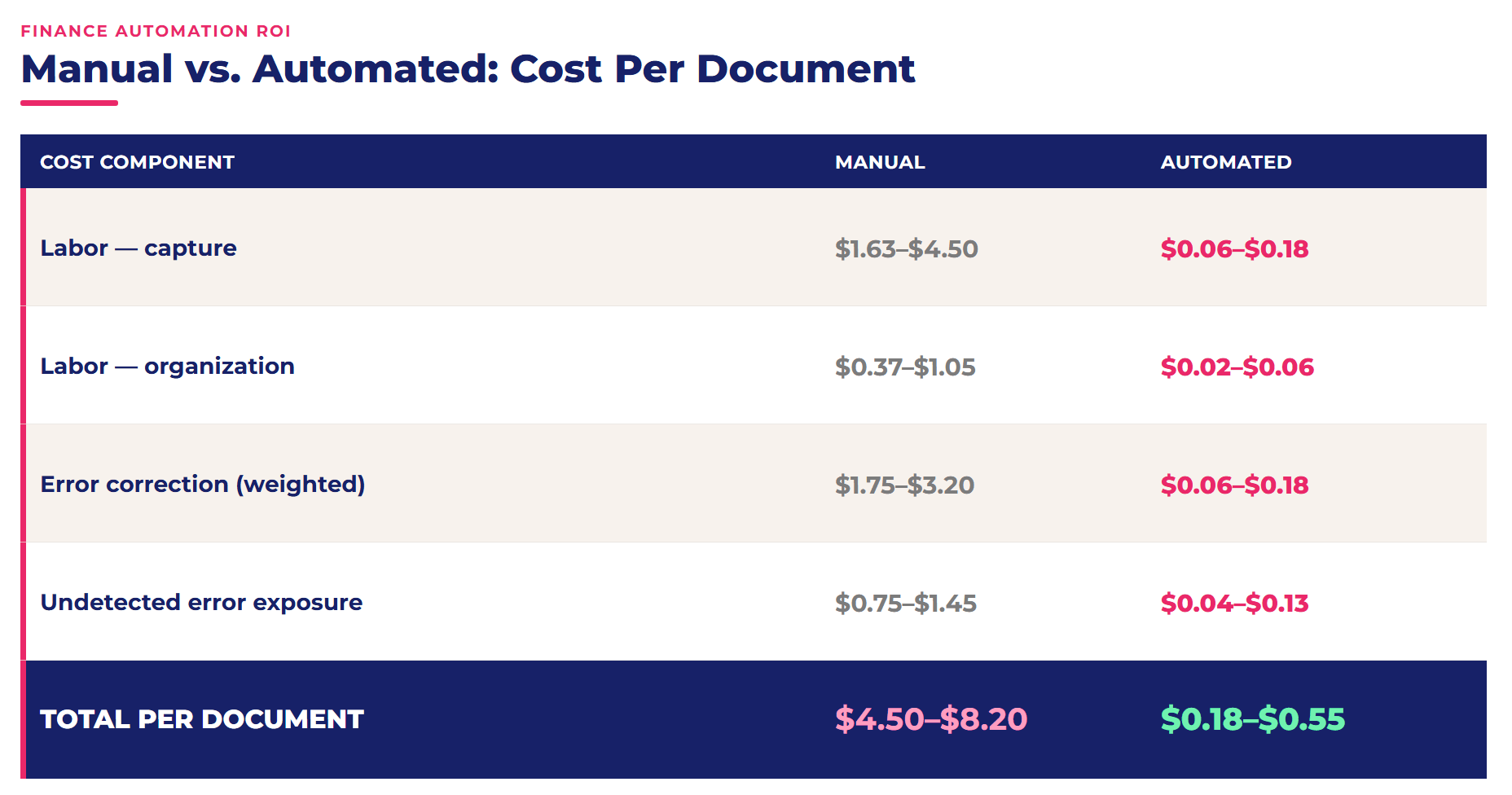
Source: Scraping Pros deployment benchmarks, 200+ enterprise clients, 2025–2026.
The cost-per-document differential — $4.50–$8.20 manual versus $0.18–$0.55 automated — compounds materially at scale. Independent benchmarking from APQC shows the same pattern industry-wide: best-in-class AP teams process invoices for under $5 each, while bottom-quartile performers exceed $30. At 20,000 documents per year, the annual processing cost differential is $86,400–$153,000. That’s the number the PDF automation ROI business case has to start with.
The most underestimated cost isn’t labor — it’s opportunity cost. An AP analyst processing 80 invoices per day manually isn’t available for spend analysis, anomaly detection, or payment terms optimization. That reallocation of analytical capacity is a return that never appears in a document processing cost model but is consistently cited by finance leaders as the most significant outcome of automation at 12 months.
2. Where PDF Automation ROI Actually Comes From
PDF automation ROI has a specific structure that most cost-benefit analyses misrepresent. It isn’t linear, it isn’t immediate, and it doesn’t come from a single source. Understanding that structure is what separates a business case that gets approved from one that gets deferred.
The ROI curve: three phases
- Months 1–2 — investment without visible return: implementation, integration with ERP or accounting systems, document type configuration, validation schema setup, and testing. For a mid-scope implementation (5,000–20,000 documents per year, 3–5 document types, API integration with ERP), total implementation cost runs $12,000–$28,000. The cumulative ROI curve is at its lowest point.
- Month 3 — first operational impact: automated volume begins to accumulate. At 1,500 documents per month and a cost differential of $4.32–$7.65 per document, monthly gross savings reach $6,480–$11,475. The curve begins its recovery.
- Months 4–7 — breakeven: accumulated savings cross the implementation cost line. Breakeven timing is primarily determined by monthly volume — higher volume means faster breakeven. Well-scoped Scraping Pros deployments reach breakeven consistently between months 4 and 7.
- Months 8–12 — compounding return: past breakeven, the marginal cost of each additional document is near zero on amortized infrastructure. Twelve-month returns across Scraping Pros’ PDF automation ROI benchmark range from 2.8× to 5.2× the initial investment, with greater upside in high-volume deployments.
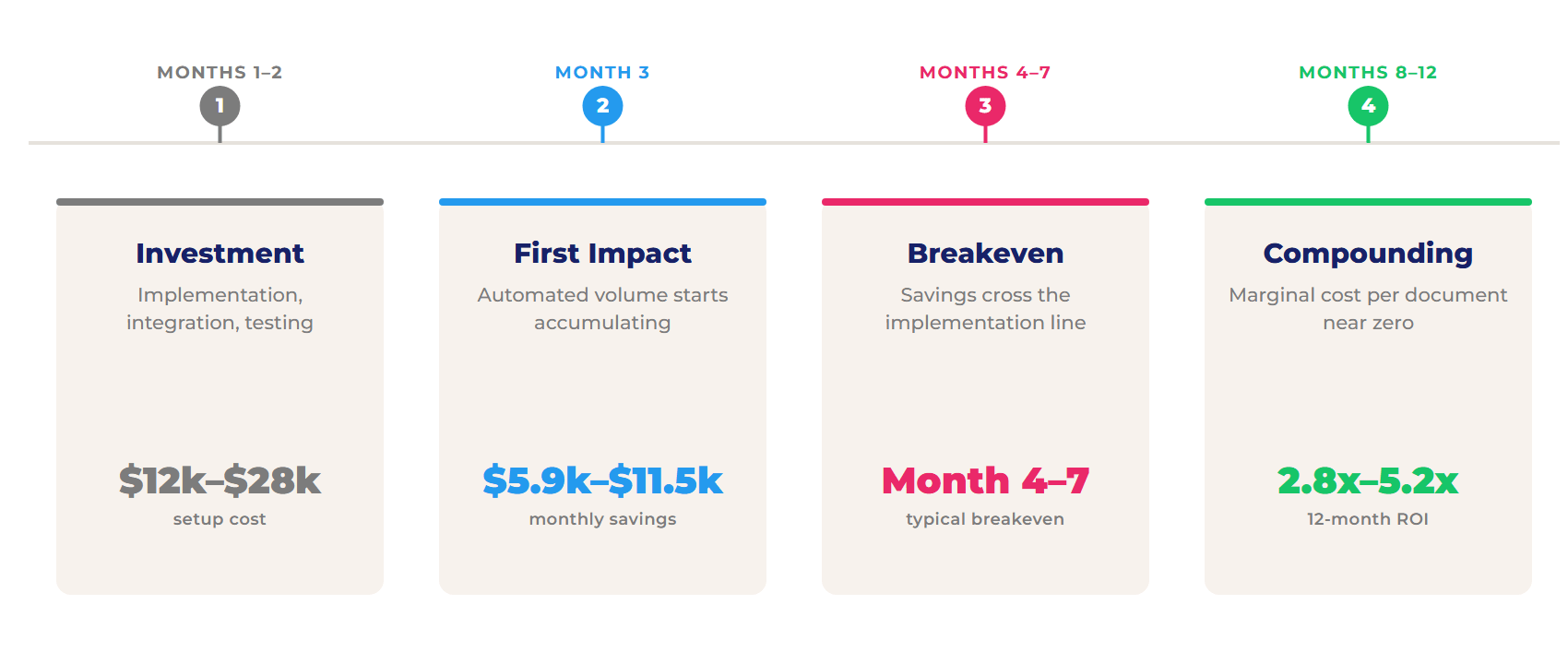
Three sources of return — all three need to appear in the PDF automation ROI business case
- Direct labor savings: the most visible and easiest to calculate — monthly volume × (manual time per document minus post-automation supervision time) × hourly cost. Typically 55–65% of total ROI.
- Error rate reduction: automated extraction on calibrated systems reduces field error rates from 1.5–3.2% to 0.3–0.8%, a 65–80% reduction. The savings on error correction and undetected error exposure represent 20–30% of total ROI and are the piece most frequently omitted from business cases presented to leadership.
- Early payment discount capture: organizations with manual AP cycles averaging 25–30 days systematically miss 2/10 net 30 discount terms offered by suppliers. With automated processing cycles measured in minutes rather than days, discount capture rates improve significantly. For high-volume organizations, this source of return alone can match the implementation cost within the first year.
São Paulo, Brazil · Mid-market manufacturing company — 18,000 invoices/year
A Brazilian industrial supplier was processing 18,000 supplier invoices annually across three ERP instances in Brazil, Argentina, and Colombia, with AP teams in each country entering data manually. Field error rate: 2.8%. Average processing time: 5.1 minutes per document. Annual processing cost (labor + error correction): $127,400. After deploying automated invoice extraction with multilingual normalization for Portuguese and Spanish documents, processing time dropped to 0.4 minutes per document for supervised review. Field error rate: 0.6%. Annual cost post-automation: $14,200. ROI breakeven: month 6. 12-month net savings: $83,900.Chicago, USA · Regional financial services firm — 31,000 documents/year
A financial services firm with $2.1B in assets under management was processing 31,000 documents annually — fund statements, custodian reports, and counterparty confirmations — across two operations centers. Manual processing averaged 4.8 minutes per document with a 2.1% field error rate. Total annual processing cost: $198,600. Post-automation, 91% of documents process without human intervention. Supervised review averages 0.6 minutes per document. Annual cost post-automation: $21,400. Early payment discount capture added $34,000 in the first year. Combined 12-month ROI: 4.1× the implementation investment. Breakeven: month 5.
Both cases trace the same PDF automation ROI curve described above — investment, first impact, breakeven, compounding return.
3. Building the Business Case: A Finance Framework
Finance leaders who get their PDF automation ROI case approved quickly share one practice: they answer three specific questions before any vendor conversation, using their own data. The framework below can be completed in two to three hours with information already available in any AP system.
Question 1 — What is the current state cost, expressed in terms already in your P&L?
Three data points are required, all available without a full audit:
- Documents processed manually per month: available in the AP system or ERP.
- Average time per document: measurable by timing a sample of 50 documents in under two hours.
- Monthly error rate: the ratio of invoices that generate a credit note, payment adjustment, or reconciliation discrepancy.
With these three inputs, the cost model produces a monthly figure that connects directly to existing P&L lines. That figure is the opening of the business case. Without it, the conversation about automation starts in abstraction.
Question 2 — What is the future state cost, with what confidence, and what assumptions need to be validated before committing?
An honest future state model includes what vendors rarely document upfront: the implementation cost (integration, testing, and the calibration period where supervised review is still necessary), the ongoing maintenance cost (schema updates when document layouts change, exception handling), and the residual cost of human supervision post-automation — typically 0.4–0.8 minutes per document in mature systems, versus 3.5–6 minutes manually.
The calibration period deserves particular attention. Automated extraction systems need 30–60 days of supervised operation before field accuracy stabilizes at production levels. Business cases that model full automation savings from month one overstate the return in the first quarter — and undermine credibility with the finance committee when actuals come in below projection.
Question 3 — What success metrics will be measured, at what frequency, and who owns them?
This is the question most often left out of automation business cases, and the one most often responsible for successful implementations being perceived as failures. Without predefined metrics, success gets evaluated by subjective impression — which tends to focus on exceptions (documents the system didn’t process correctly) rather than on the volume processed correctly.
The five metrics to define before implementation begins:
- Throughput rate: percentage of documents processed without human intervention, measured monthly.
- Post-automation error rate: incorrect fields as a percentage of total fields processed.
- Average cycle time: from document receipt to system registration, in minutes.
- Early payment discount capture rate: percentage of available discounts captured, if applicable.
- Cost per document: total monthly processing cost divided by total documents processed, for direct comparison to the pre-automation baseline.
A PDF automation ROI business case built on these three questions gives a CFO what they actually need: the cost of doing nothing (current state), the cost of change (implementation + ongoing), and the mechanism for knowing whether the investment performed. That structure is governance, not just an ROI projection — and governance is what moves capital allocation decisions.
4. What Changes Operationally After Automation
The operational before/after behind PDF automation ROI isn’t primarily about speed — it’s about where human judgment gets applied. That distinction matters both for the business case and for managing the internal change process.
- Document receipt: before, documents arrive by email to AP inboxes, get printed or filed manually, and are assigned to analysts — the lag between receipt and first processing runs hours to days. After, documents enter the extraction pipeline within seconds of arrival regardless of channel — email, supplier portal, API, or scan — with classification and routing happening automatically.
- Capture and validation: before, the analyst reads, extracts, enters, and verifies each field visually. After, the system extracts all fields, validates against predefined schemas and existing PO data in the ERP, and presents only exceptions requiring human decision. The analyst manages exceptions, not transcription.
- Approval and payment: before, invoices move through email chains or manual workflow tools with limited visibility into status. After, every document has real-time status visible to all stakeholders, approvals carry timestamps with automatic escalation if SLAs are missed, and the payment cycle shortens from days to hours.
- The analyst role: the most important operational change, and the one most frequently mismanaged. An AP analyst post-automation doesn’t do less work — they do different work: exception management, vendor relationship quality, spend pattern analysis, payment terms negotiation. That’s a more valuable profile for the organization and, when communicated correctly, a more engaging one for the analyst.
Action Items
These five actions turn the PDF automation ROI framework above into a number your CFO can act on this quarter:
- Measure the current cost before talking to any vendor: time a sample of 50 invoices from the last month. That baseline is the business case — without it, any ROI projection is speculative.
- Calculate the actual error rate: count how many invoices in the last quarter generated a credit note, payment adjustment, or reconciliation discrepancy, then divide by total invoices processed. If the number exceeds 3%, the error cost exposure is almost certainly larger than what appears in current reporting.
- Map the document types that represent 80% of volume: automation generates the fastest ROI on the most frequent and most standardized document types. Invoices from recurring suppliers, purchase orders, and account statements are typically 70–80% of volume with the most predictable layouts.
- Define the three success metrics before evaluating any solution: throughput rate, post-automation error rate, and average cycle time. Any vendor unable to commit to reporting these monthly doesn’t have sufficient confidence in their own system.
- Calculate the value of early payment discounts currently not captured: identify which suppliers offer early payment terms and what percentage the organization currently captures. In organizations with 25–30 day AP cycles, the potential discount capture with automated processing frequently covers a significant portion of implementation cost within the first year.
Frequently Asked Questions
How much does manual PDF processing really cost?
Between $4.50 and $8.20 per document when labor, error correction, and undetected error exposure are fully accounted for. Organizations processing 20,000 documents per year typically carry $90,000–$164,000 in annual processing cost before any automation investment.
What is a realistic PDF automation ROI timeline?
Breakeven between months 4 and 7 in well-scoped implementations. Twelve-month returns range from 2.8× to 5.2× the initial investment, depending primarily on document volume and pre-automation error rate. Higher-volume operations reach breakeven faster.
Which departments benefit most from PDF automation?
Accounts Payable generates the fastest and most measurable ROI — high volume, standardized document types, direct cost savings. Legal (contract review), HR (onboarding documents), and procurement (PO matching) follow, though with longer calibration periods due to greater document variability.
How do you build the business case for leadership?
Three questions answered with internal data: what does the current state cost in measurable terms? What is the future state cost, including implementation and calibration? And what metrics will be reported monthly to confirm the investment performed? A PDF automation ROI business case that answers all three is structured as governance, not just an ROI projection.
What error rate can be expected after automation?
Field error rates drop from 1.5–3.2% in manual workflows to 0.3–0.8% in calibrated automated systems — a 65–80% reduction. The calibration period typically runs 30–60 days of supervised operation before production-level accuracy stabilizes.
