
PDF OCR accuracy hits a structural ceiling around 71–82% on the document types that matter most to enterprise teams — financial tables, multi-column reports, scanned forms. Combining layout-aware ML with document classification before extraction is what closes the gap to 91–97% PDF OCR accuracy. This post maps the architecture that makes that combination work at scale.
For a grounding on what PDF data extraction covers and when it applies, see our companion post What Is PDF Data Extraction? This post goes deeper: pipeline design, model selection by document type, table structure preservation, and throughput engineering for millions of pages — all in service of one metric: PDF OCR accuracy at scale.
1. Anatomy of a Modern PDF Extraction Pipeline
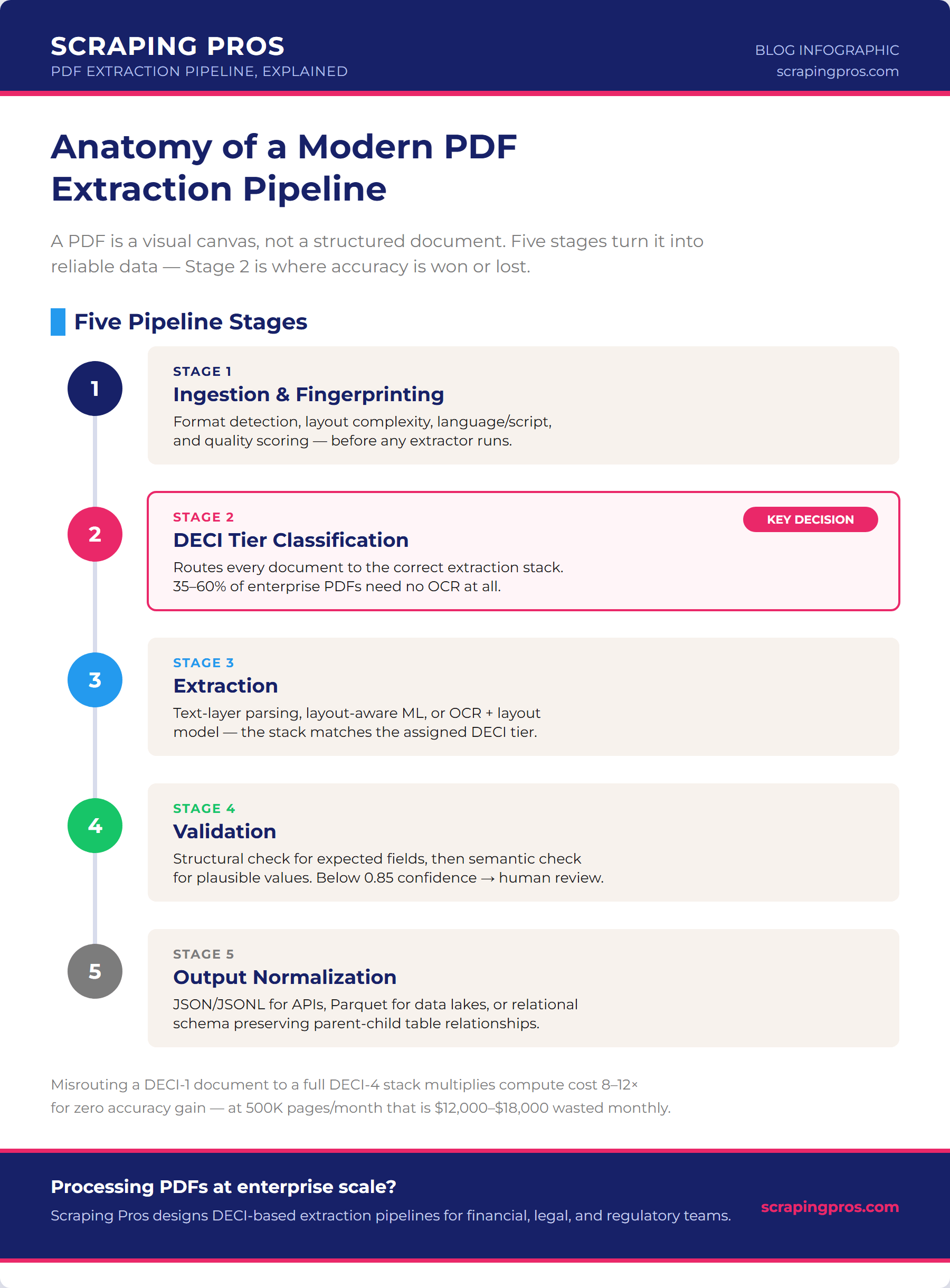
A PDF is a visual canvas, not a structured document. It stores strings of text at X/Y coordinates — it has no concept of “table,” “column,” or “heading.” Extraction is an act of semantic reconstruction from visual presentation, and the architecture of that reconstruction determines accuracy far more than the choice of any individual tool.
The pipeline has five stages. The most important design decision happens at stage two — before any extractor runs.
Stage 1 — Ingestion and document fingerprinting
Every document entering the pipeline is characterized before extraction begins. Four dimensions determine the downstream strategy:
- Format detection: does the PDF contain an embedded text layer, or is it a scanned image? A PDF with zero characters in its text stream is an image-only document — sending it to a text parser returns nothing, not degraded output, and misrouting it here is the single fastest way to tank PDF OCR accuracy before extraction even starts.
- Layout complexity: single-column, multi-column, tabular, form? This determines whether a rule-based parser is sufficient or a layout model is required.
- Language and script: non-Latin scripts (Arabic, CJK, Devanagari) require script-specific OCR models. Detection before extraction prevents silent PDF OCR accuracy degradation.
- Quality scoring: for image PDFs, PSNR and estimated resolution determine whether image enhancement runs before OCR or whether the document goes directly to extraction — this single decision has the largest downstream impact on PDF OCR accuracy.
Stage 2 — DECI tier classification
DECI (Document-Extractor Compatibility Index) is the routing logic that determines which extraction stack — and ultimately which level of PDF OCR accuracy — each document receives. Four tiers:
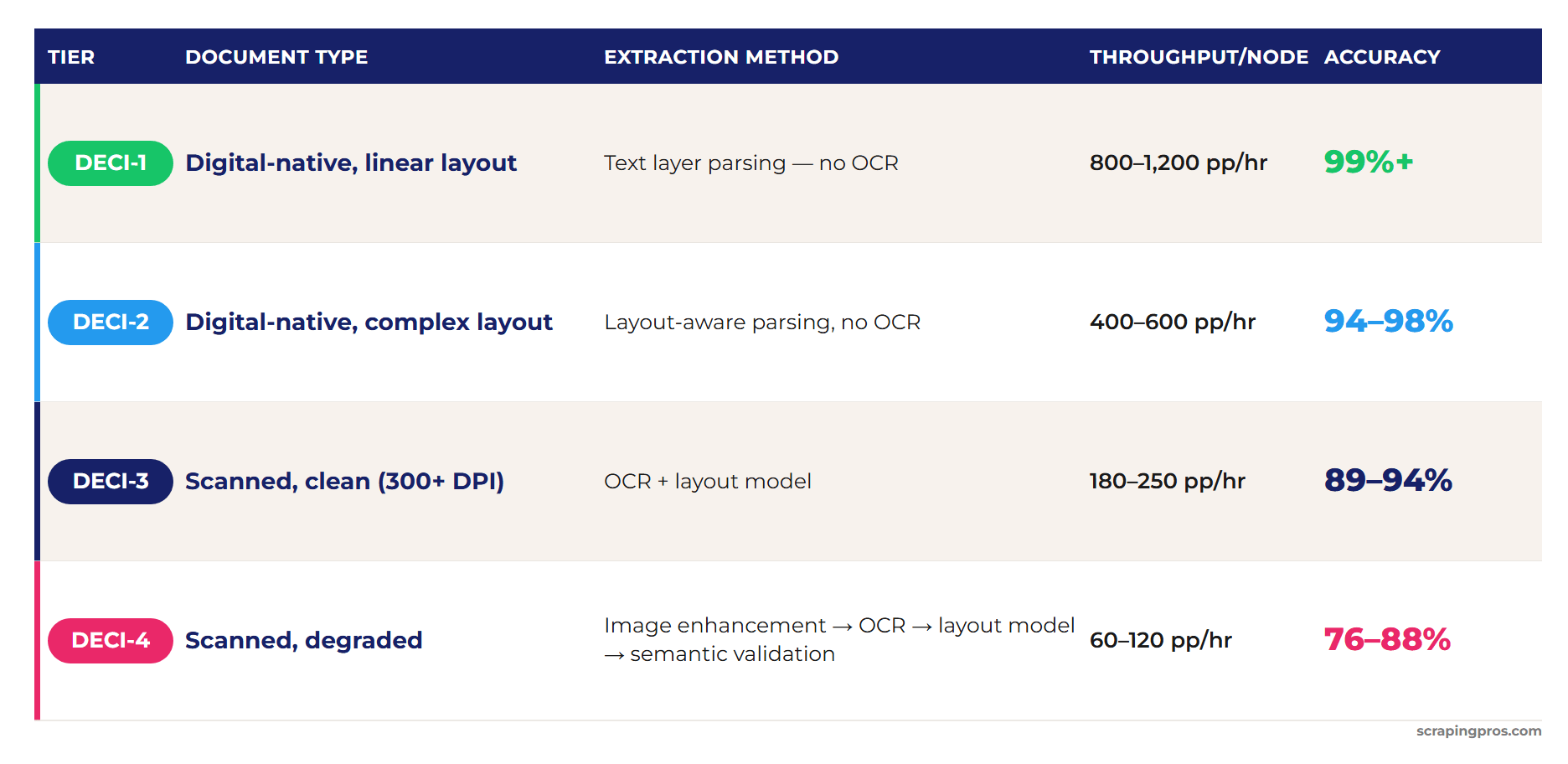
Source: Scraping Pros production pipeline benchmarks, 2025–2026.
Each tier represents a different ceiling on PDF OCR accuracy — from 99%+ at DECI-1 down to 76–88% at DECI-4 — before layout-aware processing enters the pipeline.
The commercial case for DECI classification is direct: 35–60% of enterprise PDF corpora is DECI-1 or DECI-2 — documents that require no OCR. Processing them with a full DECI-4 stack multiplies compute cost by 8–12× with zero accuracy benefit. At 500,000 pages/month with 45% DECI-1 documents, that misclassification costs $12,000–18,000 monthly in wasted compute.
Stages 3–5 — Extraction, validation, output
After DECI routing, the extraction layer runs the appropriate stack. Stage 4 — validation — is where most pipelines underinvest. Two validation passes are required: structural (does the output contain the expected fields for this document type?) and semantic (are the extracted values plausible — no negative prices, no dates in 1743, no invoice numbers containing spaces?). Fields below an 0.85 confidence threshold route to a human review queue rather than passing to the output. Stage 5 normalizes to the target schema: JSON/JSONL for API delivery, Parquet for data lakes, or relational output with foreign keys for multi-table documents preserving parent-child relationships. Skipping either validation pass is one of the fastest ways to quietly erode PDF OCR accuracy after extraction has already run correctly.
2. PDF OCR Accuracy vs. Layout-Aware Models: The Real Breakdown
The PDF OCR accuracy gap between OCR-only and layout-aware extraction is not uniform. It depends entirely on document structure. On single-column text, the delta is under 1 percentage point — OCR-only is sufficient. On financial tables and multi-column reports, the gap reaches 22–25 points.
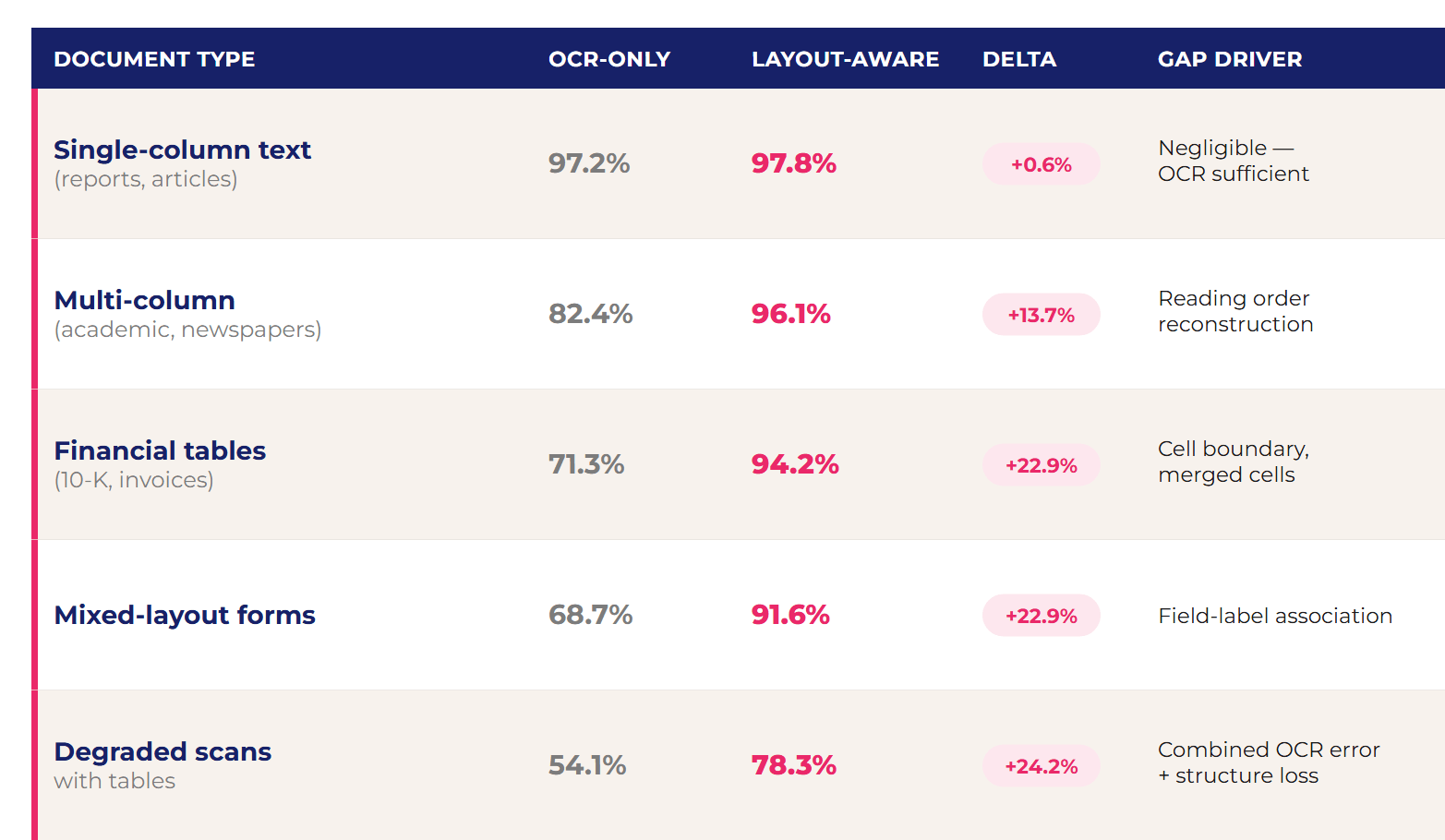
Source: Scraping Pros benchmark, 50,000 documents evaluated against human-verified ground truth, 2025.
The mechanism behind the gap: OCR converts a document into a sequence of strings ordered by page position — left to right, top to bottom. In a linear document, that sequence reproduces content correctly. In a table, it produces a continuous string that mixes row values from different columns, destroying structure. A layout model processes the same page as an image, detects the table grid first, then assigns OCR text to detected cells. The structure is preserved because it was detected before text was extracted, not inferred from text position afterward — which is why PDF OCR accuracy can’t be fixed by a better OCR engine alone.
LayoutLMv3 vs. Donut: the production trade-off
LayoutLMv3 is an encoder model combining text (from OCR), spatial position, and document image. It requires OCR as a prior step — its advantage is using spatial position to understand layout, not just text content. Best fit: DECI-1/2 documents where OCR quality is high.
Donut is an encoder-decoder processing the document image directly, without OCR. It eliminates accumulated OCR → layout error. Trade-off: fine-tuning requires labeled datasets per document type and generalizes poorly to unseen layouts. Best fit: DECI-3/4 documents with high layout variance or low image quality, where OCR error would propagate into the layout model.
Never pass raw OCR output to a layout model without confidence filtering. OCR produces a confidence score per word — filtering words below 0.70 before layout model input reduces downstream error by 15–30% in production pipelines. This one step is the most frequently skipped optimization in first-generation PDF pipelines.
3. Extracting Tables Without Losing Structure
Table extraction fails in predictable patterns. Four failure modes account for the majority of structural breakage — and the majority of lost PDF OCR accuracy — in enterprise PDF pipelines:
- Nested tables: two-pass detection resolves the failure. First pass detects outer table cells. Second pass analyzes each cell for sub-structures with looser thresholds — inner tables in financial and regulatory documents are often less formally bordered than the outer structure.
- Multi-page tables: stitch before validating. A table spanning pages 4–7 is one logical entity stored as four physical fragments. Semantic validation run page-by-page produces systematic false negatives because totals are on the last page and headers on the first — silently lowering measured PDF OCR accuracy for the whole document.
- Form topology ambiguity: label-value relationships take three layouts — horizontal, vertical, or mixed by section. Classify topology per form section before extraction. For known schemas (invoices, tax forms), resolve topology once at onboarding and apply forward.
- Tool selection — Camelot vs. tabula-py: Camelot lattice mode outperforms on fully bordered tables. tabula-py handles partially bordered tables better. For DECI-3/4 image PDFs, neither operates directly: OCR runs first with bounding box output, then Camelot/tabula-py projects OCR text onto detected coordinates — the integration point that introduces the highest accumulated error in the pipeline.
4. Scaling to Millions of Pages: Throughput & Cost
Three cost regimes
PDF processing cost does not scale linearly, and neither does PDF OCR accuracy across DECI tiers. Three regimes determine infrastructure strategy:
- Sub-scale (<10K pages/month): fixed infrastructure cost dominates. Cloud APIs (AWS Textract, Azure Document Intelligence) are typically more economical than self-hosted infrastructure at this volume.
- Mid-scale (10K–1M pages/month): variable cost begins to dominate. Self-hosted vs. cloud API reaches cost parity at approximately 80K–120K pages/month for DECI-3 and 200K–300K pages/month for DECI-1/2. Above parity, self-hosted is consistently cheaper.
- High scale (>1M pages/month): DECI-1 documents process at $0.002–0.004/page. DECI-4 at $0.018–0.035/page. The 8–15× differential between tiers at this volume makes DECI classification the single highest-leverage cost optimization available.
Three throughput bottlenecks — independent scaling required
- I/O (ingestion and output): pre-fetching 50 documents asynchronously while processing the prior batch eliminates I/O as the bottleneck for most document types. Without pre-fetching, network latency to object storage becomes the rate limiter before CPU saturates.
- OCR (DECI-3/4 only): Tesseract on CPU produces 80–120 pages/hour per node. With GPU (CUDA backend or PaddleOCR native), that rises to 600–900 pages/hour. For workloads with significant DECI-3/4 volume, GPU compute payback is typically 2–4 weeks. Note that GPU acceleration changes throughput, not PDF OCR accuracy — that gain comes only from the layout and validation stages downstream.
- Layout model inference: LayoutLMv3 on CPU: 15–25 pages/hour (impractical at scale). On A10G GPU: 200–350 pages/hour. On A100 with batch inference: 600–800 pages/hour. Batching is critical — the model processes 4–8 pages with similar latency to processing 1, so the queue must group documents before model dispatch.
Separate your throughput SLAs by DECI tier. A single “24-hour SLA for all documents” hides the fact that DECI-1 documents process in seconds while DECI-4 documents can require several minutes of pipeline. Per-tier SLAs enable correct queue prioritization and make capacity planning accurate rather than conservative.
At 1 million pages per month, a pipeline without DECI classification that defaults to the full OCR stack for every document spends 8–12× the necessary compute on the 35–60% of documents that are DECI-1. At median enterprise pricing, that misclassification represents $12,000–$18,000 in wasted monthly compute for a 500,000-page operation.
Action Items
- Profile your corpus before building: sample 500 documents from your current PDF corpus and classify them by DECI tier manually. The distribution determines your infrastructure mix. If 70% is DECI-1, GPU investment for OCR is not justified.
- Build classification before extraction: the first pipeline component should be a DECI classifier that routes documents to the correct stack — not an extractor that assumes every document is the same type. This is the single decision point with the largest effect on PDF OCR accuracy downstream.
- Filter OCR confidence before layout model input: words below 0.70 confidence score should be excluded from layout model input. This single step reduces downstream layout error by 15–30% and is the cheapest lever available for protecting PDF OCR accuracy at scale.
- Stitch multi-page tables before validating: semantic validation on page-by-page table fragments produces systematic false negatives. Stitch first, validate the complete entity.
- Run structural validation before semantic validation: check for expected field presence before checking value plausibility. A missing field will never produce a valid value — catching it at structural validation avoids wasting semantic validation compute.
- Set per-tier SLAs, not blanket processing windows: DECI-1 should deliver in minutes; DECI-4 in hours. Undifferentiated SLAs force over-provisioning for the fast tier and under-delivering on the slow one.
Frequently Asked Questions
What drives PDF OCR accuracy in an extraction pipeline?
Accuracy is determined by document classification before extraction, not by the extractor itself. Routing each document to the correct stack — text-layer parsing for DECI-1, layout-aware models for DECI-2, OCR + layout for DECI-3/4 — plus confidence-filtered validation is what drives 91–97% PDF OCR accuracy on structured documents.
How do layout-aware models outperform traditional OCR?
OCR reads text left-to-right, top-to-bottom, destroying table structure. Layout models process the page as an image, detect the grid structure first, then assign OCR text to detected cells. On financial tables and forms, that difference raises PDF OCR accuracy by 22–25 percentage points — the gap documented in the benchmark above.
How do you extract tables without breaking their structure?
Three requirements: nested table detection via two-pass extraction, multi-page table stitching before validation (not after), and form topology classification per section. Skipping any one of these produces structurally broken output on the document types where it applies.
What is the real cost of processing PDFs at scale?
DECI-1 documents at high volume cost $0.002–0.004/page. DECI-4 cost $0.018–0.035/page. The 8–15× differential makes pre-classification the highest-leverage cost optimization in any PDF pipeline. A 500K-page/month operation misclassifying 45% of DECI-1 documents as DECI-4 wastes $12,000–$18,000 monthly in compute.
