
For executives who assumed their automation stack could already read every document that lands on it.
What happens when a document has no readable structure at all?
PDF data extraction converts unstructured documents — invoices, forms, scanned reports, contracts — into structured, usable fields. It relies on layout analysis and semantic mapping, not simple text capture.
The distinction matters enough that Scraping Pros built a dedicated classification system, the Document Extraction Complexity Index (DECI), to measure exactly where extraction tools break down and why. Getting there starts with separating the process from OCR, the technique it’s most often mistaken for.
Beyond OCR: What PDF Data Extraction Actually Does
Most conversations about PDF data extraction start in the wrong place: with OCR. Optical character recognition is a single technique — it converts an image of text into machine-readable characters. PDF data extraction is the broader process that OCR sometimes participates in, and sometimes doesn’t need at all.
The process breaks into three distinct stages.
First, detecting whether the document carries a native text layer (searchable, machine-generated PDFs) or only an image (scans, photographs, faxes).
Second, segmenting the layout — identifying where a table ends and a paragraph begins, where a signature block sits relative to a total amount, where a form field’s label is separated from its value.
Third, mapping what has been read to the fields a business system actually needs: not “the number 4,821.00,” but “invoice total, in USD, for line item 3.”
A tool that only performs the first stage well is an OCR tool. A tool that performs all three is a data extraction system.
Vendors that market OCR as the finished product are describing input processing, not output usability — and that gap is where most automation projects lose time after the pilot phase, once documents stop being clean test samples and start being what actually arrives in a mailbox or an upload folder.
For a closer look at specific OCR-based methods, see our breakdown of five PDF extraction techniques.
It is also where web scraping, the discipline most of the industry associates with automated data collection, reaches its structural limit: a scraper reads a DOM, and a PDF has no DOM to read.
That structural limit is also where PDF data extraction and web scraping stop being interchangeable, even though the two are frequently priced, marketed, and staffed as the same discipline.
Where Web Scraping and PDF Extraction Diverge
They are not solving the same problem, and the gap between them shows up clearly once the two are placed side by side.
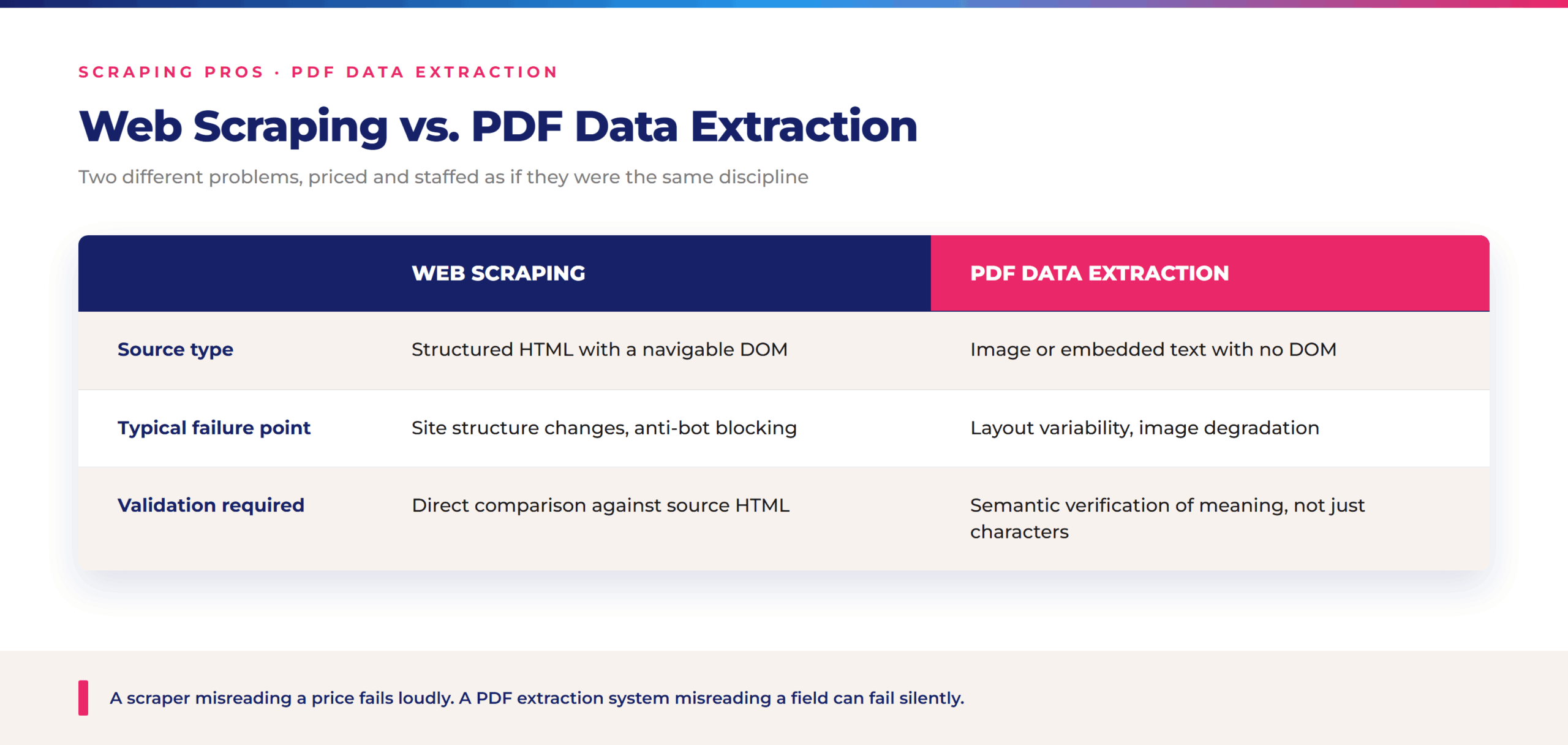
The validation row is where the two disciplines diverge most sharply for a business relying on the output. When a scraper misreads a price, the error is usually visible fast — a $0 listing, a broken currency symbol. When a PDF extraction system misreads a field, the failure can be silent: a reference number captured as an invoice total, a due date read from the wrong column of a multi-page statement. The cost of that kind of error tends to surface downstream, in a reconciliation report or an audit, not at the point of extraction.
That semantic gap — a system reading the right characters in the wrong context — is also the reason OCR-based tools tend to hold up in demos and stall out in production, a pattern specific enough to be worth mapping systematically.
The Document Extraction Complexity Index: Mapping Where OCR Breaks
Every OCR engine performs well on the same kind of document: high-resolution, high-contrast, single-column, machine-printed. Almost no real-world document population is made up entirely of that kind of document. Scraping Pros classifies documents by extraction difficulty using a five-level framework, the Document Extraction Complexity Index (DECI):
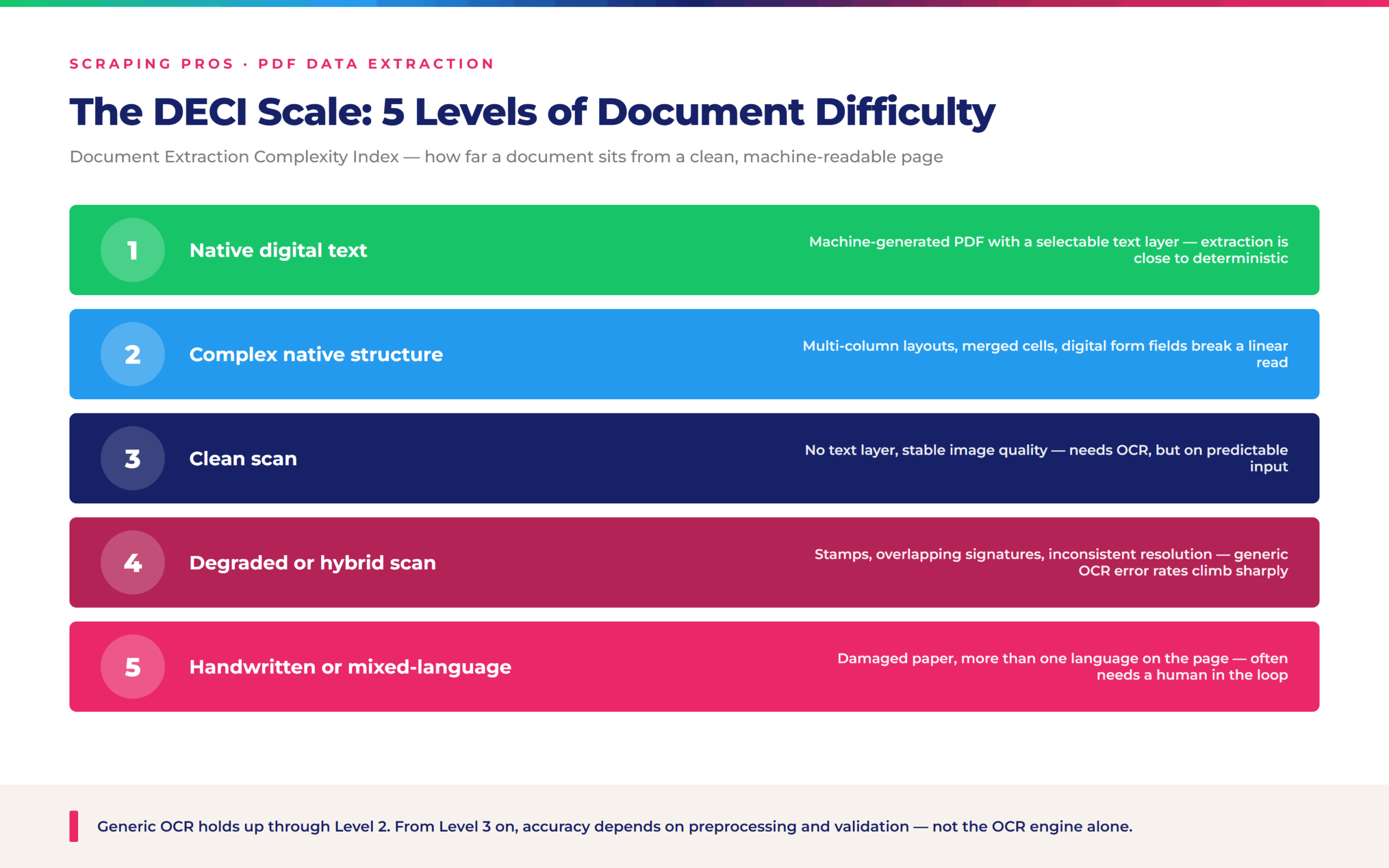
Generic OCR tools, including the free consumer utilities most teams try first, perform adequately through Level 2. From Level 3 onward, accuracy depends less on the OCR engine itself and more on what happens before and after it: image preprocessing, layout-aware segmentation, and field-level validation. That part of the stack is what most extraction vendors don’t lead with, because it is harder to sell as a single feature than “AI-powered OCR.”
Knowing where a document lands on that scale is what turns automation from a blanket policy into a targeted decision — and that decision looks different depending on the document type and the market it comes from.
The Automation Threshold: Three Regional Signals
The right moment to automate isn’t defined by volume alone — it’s defined by the moment a specific document type reaches a complexity level that manual review can no longer absorb reliably. The same threshold shows up across very different markets.
In the United States, a regional logistics carrier processes bills of lading with stamps and handwritten signatures overlapping the printed manifest — a Level 4 document by DECI standards, where manual entry teams routinely mis-key container numbers under volume pressure.
A similar pattern shows up in Europe, where a multinational retailer receives supplier invoices from dozens of countries, each on a different template, with multi-page tables and inconsistent column ordering — a Level 2-to-3 mix that breaks any extraction tool tuned to a single invoice format.
The dynamic repeats again in Latin America, where a regional financial services group processes account statements scanned from paper branches, with variable resolution and, in some cases, fax-originated documents — a Level 3-to-4 case where generic OCR accuracy drops well before the data reaches a reconciliation system.
Across all three, the trigger isn’t the industry — it’s the point at which a document type crosses from Level 2 into Level 3 or higher, where the cost of manual correction starts to outpace the cost of building a dedicated extraction pipeline. The reasoning above is what a due-diligence conversation actually covers; the questions below are the shorthand version teams tend to ask first.
Frequently Asked Questions
What does PDF data extraction actually mean?
Converting unstructured documents into structured, usable data fields, through layout analysis and semantic mapping rather than text recognition alone.
How is it different from web scraping?
Web scraping reads a navigable DOM; PDF extraction works from an image or embedded text with no DOM, and needs semantic validation rather than direct comparison against a source. See our full comparison of data scraping vs. web scraping for more.
Why do OCR tools fail on real documents?
Generic OCR performs well on clean, high-contrast, single-column documents. Most real-world documents fall outside that profile from DECI Level 3 onward.
What is DECI?
Scraping Pros’ five-level Document Extraction Complexity Index, classifying documents from native digital text to handwritten or damaged originals.
When should a business automate PDF extraction?
When a specific document type reaches a complexity level where manual review can no longer keep error rates and cost under control.
